

Before and After is photo editing blog hop hosted by Monica at Pixel Perfect.
To see more photo edits click on the button above.
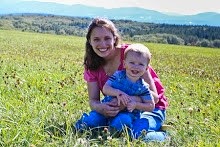
Here is a picture of Brad at the park the other day. He was being so cute running around. I love this photo of him but I wish I had been a little closer to him so....

I cropped it in Lightroom Beta 3. Then, I added my new favorite preset, "Autumn". I got that from Preset Heaven.I then hit "Punch" in Lightroom just to sharpen it a bit.
Afterward, I thought it needed a little more so I edited it in Gimp.
There I round corners. I was not getting the result I wanted under "Decor" and then "Rounded Corners," so I found another tutorial. I highlighted the area with the rectangle box in the Tools section then I went the "Select" button at the top and clicked on "Rounded Rectangle" I put in the number of 15 and then hit Ok and right clicked on the image. Finally, I clicked "Invert" under "Select" and then delete and saved it.
Here it is:
![]()
I am really happy with the rounded corners look and I finally fixed the HTML in my blog so that it does not have the black border around my images. My rounded corner photos can finally look normal! :-)
I can't wait to see other photo edits. Don't forget to click on Monica's button above.


I cropped it in Lightroom Beta 3. Then, I added my new favorite preset, "Autumn". I got that from Preset Heaven.I then hit "Punch" in Lightroom just to sharpen it a bit.
Afterward, I thought it needed a little more so I edited it in Gimp.
There I round corners. I was not getting the result I wanted under "Decor" and then "Rounded Corners," so I found another tutorial. I highlighted the area with the rectangle box in the Tools section then I went the "Select" button at the top and clicked on "Rounded Rectangle" I put in the number of 15 and then hit Ok and right clicked on the image. Finally, I clicked "Invert" under "Select" and then delete and saved it.
Here it is:

I am really happy with the rounded corners look and I finally fixed the HTML in my blog so that it does not have the black border around my images. My rounded corner photos can finally look normal! :-)
I can't wait to see other photo edits. Don't forget to click on Monica's button above.











oooo oooo ooooo he's so cute. I just wanna go run around outside now too. {with my camera of course} hehe
ReplyDeletePS. You can also do rounded corners in Picnic & you can slide the toggle to change the roundness. cool right?
PS again. I didn't do a before & after this week because of a birthday post.....but I will definitely be back next week. I love seeing everyone edits too!
ReplyDeleteLoving the overalls! You've got me interested in rounding my corners. That looks really cool!
ReplyDeleteGreat job! I LOVE it!
ReplyDeleteSo cute!!! His expression says it all in the photo...great capture!
ReplyDeleteHeather this is such a cute picture!! LOVE the edit! It really makes the picture come to life. Thanks for linking up!!
ReplyDeleteMonica
i love how you edited this - the color, crop and rounded edges really enhance the little guy! nice!
ReplyDeletevery cute!
ReplyDeleteHow adorable!!! Love it!
ReplyDeleteOK.. the baby in overalls... I love it! I miss those days!! and those rounded corners remind me of pictures from when I was a kid!! that makes me old! he he
ReplyDeleteThis is just the perfect edit for this photo!! Love it!
ReplyDeletewhat a little sweetie! Love that preset!
ReplyDeleteLove this photo. It captures his happy little boyness. :)
ReplyDeleteI love the rounded corners edit :)
ReplyDeleteGreat job! I loved your edit! And your baby is gorgeous :)
ReplyDeleteOh he is just the cutest! Love those overalls. Great photo and edit!
ReplyDeleteOh my word what a CUTE pic! Great edit too! :D
ReplyDeleteHe is adorable! I love the brightness in the edit, and the rounded corners are cool too. I definitely want to try that preset now!
ReplyDeleteMichelle
http://www.justanotherbloggingmommy.com
PRECIOUS! Great colors!
ReplyDelete