
Before and after is when: I take a photo that I have, edit it then show you the results. To see more before and afters visit Monica's blog- here.
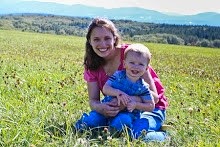
Here is the before picture of Bradley, looking past me. I don't remember what he was looking at. I think he has a cute expression on his face.
Update: I don't remember what he was looking at because I didn't take this photo! I just looked at the camera information on this picture and it was taken with the 18-35mm kit lens, and I think he was in Auto mode. My husband was using that lens the other day and trying to see what he could do with it. I always use the 50mm f/1.8 for pics of Brad. :-)
Anyway, here is the camera info for this picture: Shutter speed 1/50, f/4.5, ISO: 1000
Update: I don't remember what he was looking at because I didn't take this photo! I just looked at the camera information on this picture and it was taken with the 18-35mm kit lens, and I think he was in Auto mode. My husband was using that lens the other day and trying to see what he could do with it. I always use the 50mm f/1.8 for pics of Brad. :-)
Anyway, here is the camera info for this picture: Shutter speed 1/50, f/4.5, ISO: 1000

Here is the after-
My friend Lindsay was over and suggested I try black and white. I thought that was a good idea since two weeks ago for the first "Before and After" I did bright colors and last week I did a funky edit.
 I cropped the photo. That helped with the distractions in the background. I clicked on B&W High Contrast in LR Beta 3 and played around with exposure until I liked what I saw. Then I sharpened it a little. I didn't notice a difference when I did that though.
That was about it; pretty simple.
I really want to try textures and I am going to look into that for Gimp this week. I have been seeing some really cool photos the past couple weeks on Monica's blog hop. This has been fun!












Your edit really makes Brad pop out. :-) Next week we are going to have to try textures! That can be our goals for the next blog hop. :-)
ReplyDeleteLooks great! I really love the moodiness of black and whites. For awhile I was editing everything black and white! Ha! I love the crop, and I can tell the difference in your sharpen. He is such a sweet little boy!
ReplyDeleteI don't think I will have time to join in today. {sad} We'll see!
Such a great picture - he's definitely a cutie!
ReplyDeleteLOVE it! It's so awesome! What editing software do you use?
ReplyDeleteSo sweet! It's amazing what a little editing can do. Brad is adorable! No editing necessary!
ReplyDeleteSee, you say simple, and I say it looks awesome. I want to send you a picture or two that I have taken to see what you can do with it. Would you be up for it? Then maybe post your results?
ReplyDeleteLooks awesome! I love how the crop and black and white really shows off his cute expression!
ReplyDeleteLove your B&W conversion. I'm a big fan of high contrast black and whites. Wonderful!
ReplyDeleteI love that look!! Very impish! Like he is about to get into something!! Great edit!
ReplyDeleteWow, it's absolutely beautiful! I love how you went to grayscale without washing him out.
ReplyDelete~Elizabeth
Confessions From A Working Mom
soooooooooo cute! love the b&w!
ReplyDeleteLove it! Those eyes are amazing!
ReplyDeletewow ! great job!
ReplyDeleteSo great! I love the black and white and the cropping!
ReplyDelete